Friday, 13 October 2017

Week 4 Reflections Writing Objectives

Week 4

Reflection


Week four technology class was a productive and knowledgeable one. We learnt about the VARK questionnaire and the ASSURE model of teaching and how it is used to state the objectives of a lesson which should be geared to reach all types of learners in the classroom. According to Bloom's Taxonomy when writing objectives they must be specific based on the KSA domain.


Task:
  • Write specific objectives using the KSA method
  • Editing blogs placing post on page so it could be viewed by others

What have I learnt:
  • When writing objectives for a lesson we must make sure to cater for all types of children according to the VARK based model of learners.
Image result for the vark model
Objectives for all lessons must be Behavioural, Specific and Instructional. They must be measurable and can be observed at all times. They should be statements of what the students will be able to do at the end of the learning. Using the ASSURE model is the best way to go when writing these objectives.


When writing objectives, according to Blooms Taxonomy they must be written from the lower order to the higher order level of thinking.


Related image


Also when writing the objectives one should make sure to:
  • Step 1: Start with a stem sentence (Students will be able to  learn)
  • Step 2: Determine the learning outcomes
  • Step 3: Consult the blooms wheal to select the appropriate level of verbs
  • Step 4:  Write the verb and learning outcomes into a statement that when combined with the stem forms a complete sentence.
*Note: Never use words such that are not measurable or observable such as (known, understand, learn, appreciate, become familiar, be aware of) etc.

When constructing objectives the ABCD's of strong objectives MUST be used at all times.
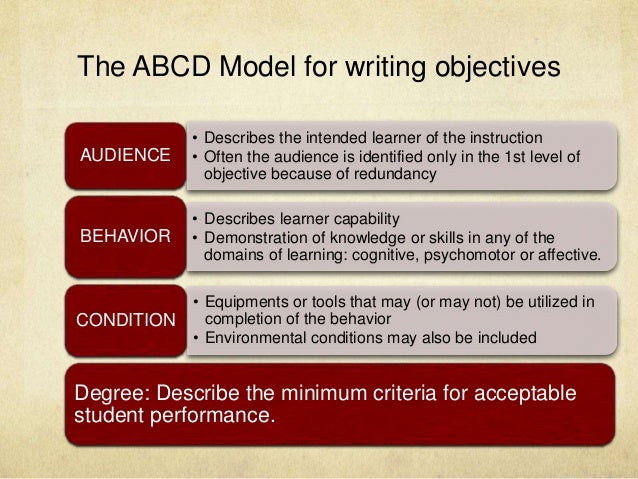
Image result for abcd objectives


Examples of Objectives

Audience     Behaviour      Condition      Degree

At the end of the lesson, students will be able to:

1. Construct a KWL chart in word document using the insert table from tool bar with 100% accuracy.

2. Read with ease information on weather systems using a download pdf file of the 3 chapters of the metrology text book.

3.Express  with confidence their ability to code switch from Creole to Standard English using a haiku poem.


Verb Wheel

Image result for blooms taxonomy verbs

What have I learnt:

At the end of week 4, I have learnt how to construct my objective for a lesson so that they would be child focus, along with how to go about editing my blog.


Challenges faced:

While writing objectives was a minor challenge for me, I had a small problem constructing my objectives based on the attitude or affective domain of the KSA objectives. Editing my blog and getting my reflections on my page for others to view accordingly was another challenge for me.

How challenges were over come:

With the PPP rule that I am govern by weekly in EDET class, along with google and myself trying to figure it out on my own my challenge was over come.


Conclusion:

This week was another learning experience for me, I have learnt the importance of using the VARK model to cater for the different learning styles of students I may encounter in the classroom, along with how to construct my objectives when planning a lesson according to Blooms Taxonomy and the ABCD's of Objectives. 


Friday, 6 October 2017

Week 3 Reflections: Creating an E-journal Blog and Blogging

Reflection

Week 3


         Week three was a challenging but yet an informative and eventful one. we learnt to create a blog and started blogging. We also learn about different types of copy right laws such as creative common fair laws and open educational resources, synchronous and asynchronous communication, book marking, search engines, viruses, antivirus and malware.

Task:
  • Create a blog and use it as an online journal
  • Reflect on what was done in EDET class and make reflections blog post on the blog

Steps:


What I have learnt:

Synchronous and Asynchronous Communication


Copy right laws:

           Open Education Resources, Fair Use, Creative Common


Creative Common Law - is a set of a copy right licenses which clarifies what you can do with the content you share in the global community.

Fair Use - permits limited use or copyrights without permission from the copyright holder.

Operational Educational Resources - are freely, openly licenced text media and other digital assets that are useful for teaching, learning and assessing as well as for research purposes.


Viruses and Virus Protections


Antivirus

 A computer Antivirus is a program built to safe guard your computer to malicious attacks from dangerous files called viruses. Some or most antivirus software include an anti sypware component which protects your computers from other harmful files called spyware.


Challenges faced:
  • creating and editing the blog
  • adding pictures and videos to the blog


How challenge were come:
  • with the help of the P sisters learnt in class patience practise and perseverance.
  • watching tutorial on YouTube to assist me in getting the task done.


I will use what I have learnt to:
  • keep blogging and keep my blog updated
  • inform others through my blog of my learning experiences
  • assessing the open education resources


Conclusion:
                  Blogs are online journals that are used to express oneself by writing and sharing experiences, this can be used by students in a class along with teachers to share our classroom experiences.


Week 2: Reflection Internet Uses in the Media


Reflection

Week 2

          Week two was a very informative week. We have learned how to set classroom rules, and the importance of NOT participating in certain acts when using the internet and sending emails.

Task:
  • sending an email within a group and adding your signature to your email account, having it appear at the end of every email without having to write it all the time.
  • sending an email using the global code of conduct netiquette.

Steps: Adding signature to your gmail
  • Go to settings
  • Scroll down until signature
  • Select signature
  • Type your signature
  • Save


What I have learnt:
Classroom Rules

Guidelines when writing classroom rules:
  • should be short
  • straight to the point
  • 5 rules are appropriate for primary school level
  • children should have input in making rules
  • Be explicit


Netiquette in Media

Internet - A global computer network providing a variety of information and communication facilities, consisting of interconnected networks using standardized communication protocols.


Etiquette - customary code of polite behaviour in society or among members of a particular profession or group.


Netiquette - the correct or acceptable way of using the Internet.


Here are some netiquette rules:
  • Make sure an appropriate email address is used
  • Always use a greeting to begin your email
  • The use of proper grammar, spelling and punctuation etc. must be used.
  • Front and front size must be appropriate
  • Always state the subject of your mail
  • Watch your level of tone,( bolding, capitalizing etc. )
  • End with an appropriate closure
  • Re-read your email after creating and before sending
  • Use a signature at the end of your email content
  • Acknowledge emails received

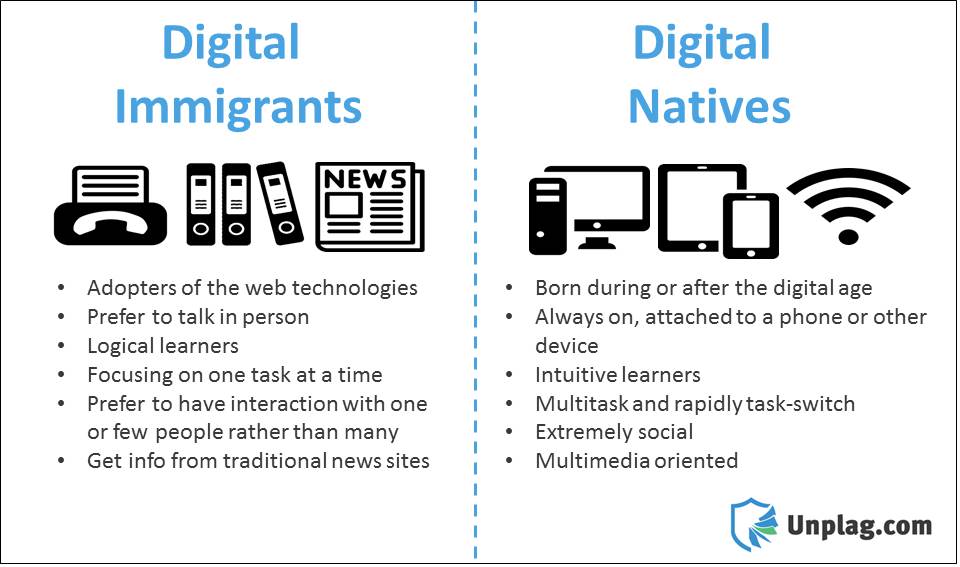
Digital Native and Digital Immigrant


Digital Native - a person born or brought up during the age of digital technology and so familiar with computers and the Internet from an early age


Digital Immigrant - a person born or brought up before the widespread use of digital technology.


Image result for digital native and digital immigrant

Challenge faced:
                          I did not face any challenge completing the task in week two.


Conclusion:
                   This week was definitely a learning experience, for I have learnt about the importance of having classroom rules and the various netiquette approaches of sending email, which will better equip me of the does and don'ts when sending electronic mails. With all that I have learnt so far I can say that I am slowly moving from a digital immigrant into a digital native.


Week 1 Reflection: Role of Technology

  Reflection

Week 1


          I began technology class with an open mind not knowing what to expect, however knowing that I will be learning more experience due to the fact I am not updated with new technology programs and their features. with an introduction of each student teacher and the tutor introducing themselves with an adjective along with stating an expectation about the course the class was on its way.
       A brief synopsis of the course was given, then the ball went rolling. we began researching various terms used in technology, the role of technology, types of learners, different learning styles, and multiple intelligence.

Task:
         Creating an email account with either gmail or hotmail, adding contacts of classmates, followed by a group contact with all members of the class

Steps:
  • signed into gmail or hotmail accounts
  • click on drop down menu
  • select contacts
  • add each individual email using new contacts
  • create a class group using individual contacts that was added


Challenge faced:
  • having to locate the contacts of all the individuals in the class

Overcoming challenge:
  • Assistance was given by a classmate and tutor on how to create contact list a group and adding persons to the contact list.

What was learnt:


The role of technology


The (6) categories of media


Types of learning styles


Multiple intelligences


Conclusion:
                    Completing week one had taught me so much from creating a group email, to the role and function of technology in education, the different learning styles and types of learners that exist in society. I'm now able to communicate with friends, family, co-workers and others whom I wish to send the same messages to in a group instead of doing so singly. This week also has place me in a better position the cater for the children in my classroom using technology, based on the type of learners and their learning styles. 

Week 9 Reflection Processing

Week 9 Reflection Document Processing Week 9  Reflection This week it was all about Word Processed Documents, utilizing the feature...