This week it was all about Word Processed Documents, utilizing the features of Microsoft word to create a creatively document.
Task:
Creating, editing and formatting of a document that I created using page numbers, inserting backgrounds, page colour, borders, watermark along with using auto shapes and word arts working page orientation.
Here is what the final product looks like.
Add to dictionary faced:
Processing documents all the time is something that I am accustom to do so it was not a problem.
How will i use this:
I will continue to use word processing to create creative different documents I will use in class and for my own personal use.
Conclusion:
Word processing allows you to be very creative with your documents.
This week the focus was on spread sheet and its use to record grade, calculate average and total amount amount etc.
Task:
We had to create, edit and format a document in spread sheet inserting and adjusting column and rows to accommodate the wording. text wrapping working with graphics auto shapes working averages etc.
Here are some sample of spread sheet.
Challenges faced:
Using spread sheet wasn't as difficult as I taught it would be. with instructions provided by the teacher as to the following steps to follow completing the task was the exercise given was been able to complete.
What I have learnt:
I have learnt to use spread sheet to record numbers and work out the averages and total amount without a physical calculator.
Conclusion:
Spreadsheet is an easier way of keeping records digitally.
This week we focused on power point. We did so by creating a whole class power point, where each individual had the opportunity to perform a task to complete the power point presentation. We were also placed into groups to create a lesson using one of the following power point application, Prezi, Wordle, and Mind Map (Mind Master) making a presentation to the class.
Task:
Creating a class power point
Creating a group presentation using Prezi. On this presentation we had to complete the following task, changing the template, adding a topic, adding the details to each slide pertaining to the topic adding animation to each slide and text also adding videos and references.
Using power point wasn't a problem for me. However a few other classmate had issues in completing their task. For the competition of our group Prezi presentation, we had to explore how to use the application since we weren't familiar with it. After signing into the app with limited use because the account was basic, the task was completed despite the limitations.
Challenges faced:
In the Prezi we encountered a challenge in adding the videos to the slide. how ever it was overcome by watching a video.
What I have learnt:
In Power Point I learnt how to add animation for words, adding sounds and how to hide and reveal slides in the presentation. I also learnt how to create a presentation using Prezi as a slide presentation including videos and images.
Conclusion:
Power point and Prezi are similar apps but Prezi is more advanced and creative way to show a Power Point
.Completing the task was not challenging except for the uploading a picture into the quiz I had a little minor issue. after 3 attempts I got the issue solved.
What did I learnt:
In google form I have learnt that it can be used to conduct quiz/test survey, invitations etc and google can be used to type documents and other information.
How will I use it:
This can be use this Google forms and to complete simple survey and test with my students.
Conclusion:
I can see myself using this in my classroom even personally.
This week was focused on creating our own video and podcast. we first had to download the applications to do so. audacity and windows movie maker. we also had to create a podcast script. to be able to save files on audacity as mp3 lame encoder had to be downloaded.
I encountered difficulty in downloading windows movie maker so I have to resort to Video Pad by NCH. using video pad was also challenging but with the help of my lecturer and course mate the task was completed. downloading audacity and creating the podcast was not really challenging.
What was learnt:
Audacity can be used to record and make audio files, cut downloaded music to your device to how you want it. video pad movie maker is a great app used to create a video, by adding images, music and things you record using cameras and even video downloader fro YouTube, or the internet. we also learnt how to cite reference all videos, images etc. hat is taken from another source and not originally yours.
Conclusion:
Using each application to enhance my lesson, when I return to the classroom making them more interesting even in my everyday life.
this week I learnt a lot, and will definitely be using these application to their full potential.
Week four technology class was a productive and knowledgeable one. We learnt about the VARK questionnaire and the ASSURE model of teaching and how it is used to state the objectives of a lesson which should be geared to reach all types of learners in the classroom. According to Bloom's Taxonomy when writing objectives they must be specific based on the KSA domain.
Task:
Write specific objectives using the KSA method
Editing blogs placing post on page so it could be viewed by others
What have I learnt:
When writing objectives for a lesson we must make sure to cater for all types of children according to the VARK based model of learners.
Objectives for all lessons must be Behavioural, Specific and Instructional. They must be measurable and can be observed at all times. They should be statements of what the students will be able to do at the end of the learning. Using the ASSURE model is the best way to go when writing these objectives.
When writing objectives, according to Blooms Taxonomy they must be written from the lower order to the higher order level of thinking.
Also when writing the objectives one should make sure to:
Step 1: Start with a stem sentence (Students will be able tolearn)
Step 2: Determine the learning outcomes
Step 3: Consult the blooms wheal to select the appropriate level of verbs
Step 4: Write the verb and learning outcomes into a statement that when combined with the stem forms a complete sentence.
*Note: Never use words such that are not measurable or observable such as (known, understand, learn, appreciate, become familiar, be aware of) etc.
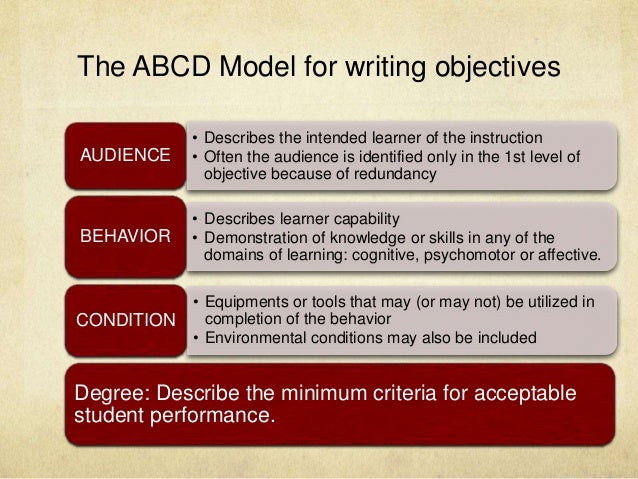
When constructing objectives the ABCD's of strong objectives MUST be used at all times.
Examples of Objectives
AudienceBehaviourConditionDegree
At the end of the lesson, students will be able to:
1. Construct a KWL chart in word document using the insert table from tool bar with 100% accuracy.
2. Readwith ease information on weather systems using a download pdf file of the 3 chapters of the metrology text book.
3.Express with confidence their ability to code switch from Creole to Standard English using a haiku poem.
Verb Wheel
What have I learnt:
At the end of week 4, I have learnt how to construct my objective for a lesson so that they would be child focus, along with how to go about editing my blog.
Challenges faced:
While writing objectives was a minor challenge for me, I had a small problem constructing my objectives based on the attitude or affective domain of the KSA objectives. Editing my blog and getting my reflections on my page for others to view accordingly was another challenge for me.
How challenges were over come:
With the PPP rule that I am govern by weekly in EDET class, along with google and myself trying to figure it out on my own my challenge was over come.
Conclusion:
This week was another learning experience for me, I have learnt the importance of using the VARK model to cater for the different learning styles of students I may encounter in the classroom, along with how to construct my objectives when planning a lesson according to Blooms Taxonomy and the ABCD's of Objectives.
Week three was a challenging but yet an informative and eventful one. we learnt to create a blog and started blogging. We also learn about different types of copy right laws such as creative common fair laws and open educational resources, synchronous and asynchronous communication, book marking, search engines, viruses, antivirus and malware.
Task:
Create a blog and use it as an online journal
Reflect on what was done in EDET class and make reflections blog post on the blog
Steps:
What I have learnt:
Synchronous and Asynchronous Communication
Copy right laws:
Open Education Resources, Fair Use, Creative Common Creative Common Law - is a set of a copy right licenses which clarifies what you can do with the content you share in the global community. Fair Use - permits limited use or copyrights without permission from the copyright holder. Operational Educational Resources - are freely, openly licenced text media and other digital assets that are useful for teaching, learning and assessing as well as for research purposes.
Viruses and Virus Protections
Antivirus
Acomputer Antivirus is a program built to safe guard your computer to malicious attacks from dangerous files called viruses. Some or most antivirus software include an anti sypware component which protects your computers from other harmful files called spyware.
Challenges faced:
creating and editing the blog
adding pictures and videos to the blog
How challenge were come:
with the help of the P sisters learnt in class patience practise and perseverance.
watching tutorial on YouTube to assist me in getting the task done.
I will use what I have learnt to:
keep blogging and keep my blog updated
inform others through my blog of my learning experiences
assessing the open education resources
Conclusion:
Blogs are online journals that are used to express oneself by writing and sharing experiences, this can be used by students in a class along with teachers to share our classroom experiences.